
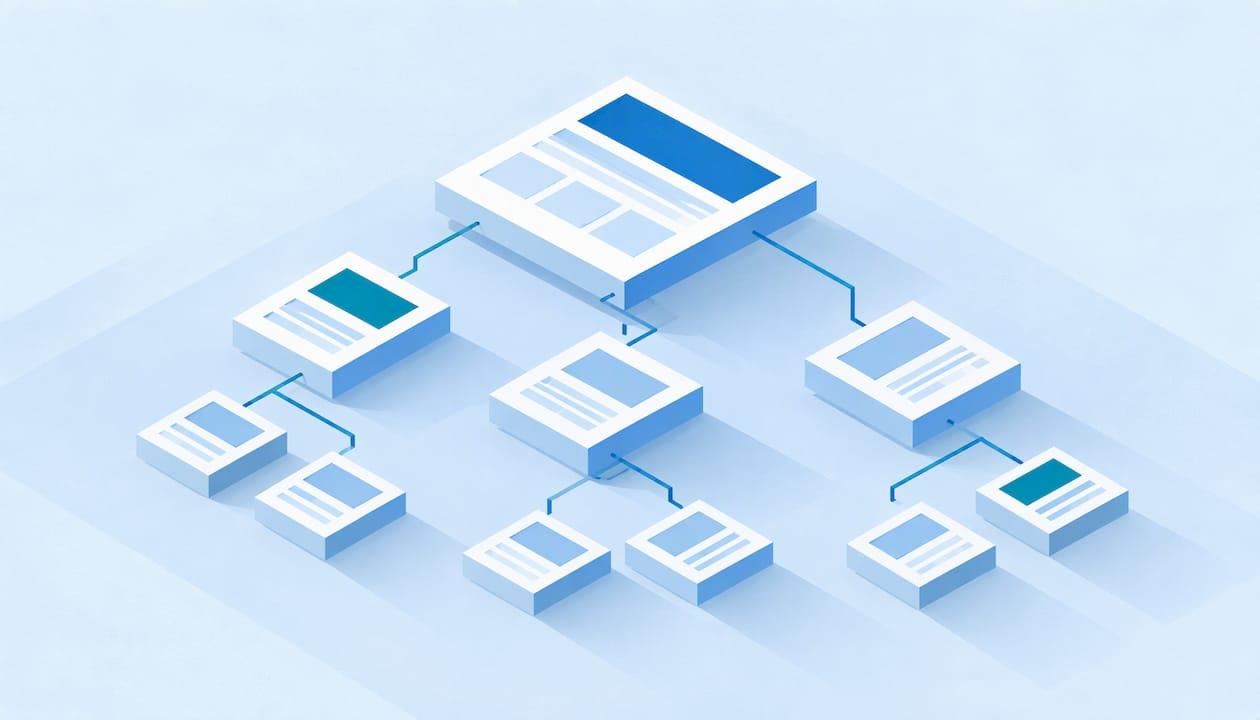
Website architecture is the way your pages are grouped and linked: a homepage, a few main sections, and the pages inside each one. Search engines use those links to find your pages and work out what each one is about. Visitors use them to find what they came for. A clear structure puts your money pages (services, products, locations) within a few clicks of the homepage, groups related pages under one topic, and links them to each other on purpose.
This guide is for owners and marketing leads at local businesses, service companies, online stores and B2B firms. You do not need to be technical. You need to know what a good structure looks like, how to plan one, and where sites usually go wrong.
TL;DR
- Architecture is your page hierarchy plus the internal links that connect it. It decides how easily Google and customers reach your most valuable pages.
- Keep important pages within three to four clicks of the homepage, and group related pages under a clear parent page.
- Use plain menus, readable URLs, breadcrumbs and contextual links in your copy. Every page should be linked from somewhere.
- Service businesses, stores and B2B sites need different shapes. Plan around the pages that earn you revenue.
- Review the structure at least once a year, and again every time you add a batch of pages.
Table of Contents
- What website architecture means for SEO
- Why structure affects rankings and leads
- The four structure models
- Flat or deep: how many clicks is right
- How to plan your structure
- Architecture by type of business
- Common architecture problems and how to spot them
- Where a technical audit fits
- Keeping the structure healthy as you grow
- Work with Hookd on your site structure
- FAQ
- Sources
What website architecture means for SEO
Think of your site as a building. The homepage is the lobby, the main sections are the floors, and individual pages are the rooms. Architecture is the floor plan and the hallways between rooms.
HubSpot defines website architecture as the hierarchy of pages as reflected in internal links, built so users can find information and crawlers can understand how pages relate. A crawler is the automated program a search engine uses to visit pages and follow links.
Two terms get mixed up here:
- Information architecture is the plan: what content exists and where each piece belongs. Search Engine Journal describes it as the site's framework, giving every piece of content a home.
- The linking hierarchy is the actual path people and crawlers follow through links. It is not the same thing as your URL structure, although URLs can support it.
For a business owner the practical meaning is simple. If someone searches "emergency AC repair Houston" or "commercial printing vendor," your site needs one obvious page that answers it, reachable without a hunt.
Why structure affects rankings and leads
Structure helps in two ways at once.
For visitors. Search Engine Land explains that a strong architecture helps people find what they need faster, which supports longer visits, more conversions and fewer people bouncing back to a competitor's result.
For crawlers. Clear pathways show search engines which topics your site covers and which pages matter most. The same guide notes that pages sitting beyond about four clicks are treated as less important. Because Google's crawl budget for any one site is limited, hard-to-reach pages may go uncrawled and unindexed. Crawl budget is simply how many pages Google is willing to fetch from your site in a given period. For a 40-page local business site this is rarely a limit. For a store with thousands of products it can be.
Internal links also carry authority from strong pages to weaker ones. If your homepage and top blog posts earn links from other sites, the way you link onward from them decides which service pages benefit.
Google's own documentation adds one technical rule worth knowing: Google can generally only follow a link that is a standard HTML anchor element with an href attribute. Menus built in ways that do not output real links can hide whole sections from crawlers.

The four structure models
Search Engine Land lists four common models:
| Model | How it works | Best for |
|---|---|---|
| Hierarchical | Tree: homepage, categories, pages | Most business sites |
| Sequential | Step-by-step path | Checkout flows, application forms |
| Matrix | Grid with several ways to browse | News sites, very large catalogs |
| Database | Modular, driven by queries | Marketplaces at huge scale |
If you run a service company, a clinic, a law firm, a B2B manufacturer or a typical online store, the hierarchical model is your default. Yoast describes the ideal as a pyramid: homepage, then categories or sections, then optional subcategories on larger sites, then individual pages and posts.
Sequential structures matter inside your site, not as its overall shape. Your quote request or checkout is a sequence, and it should stay simple.
Flat or deep: how many clicks is right
A flat structure keeps most pages within three clicks of the homepage. A deep one buries pages four or more clicks down. Search Engine Land says deep structures are practical for very large catalogs or archives but harder for crawlers and users to reach.
The Nielsen Norman Group, a respected usability research firm, found that content is more discoverable when it is not buried under many layers. It also found that deep hierarchies tend to produce fewer, more generic categories at each level, which confuses visitors.
But flatter is not always better. Google's John Mueller has said that when every page sits one or two clicks from the homepage, it becomes hard for search engines to see which pages belong together. A hierarchical structure is easier to understand on larger sites.
The workable answer for most businesses:
- Keep your revenue pages within three clicks.
- Do not dump 80 pages into the main menu to achieve it.
- Group pages under parent pages that name the topic, so the shape itself tells Google what belongs together.
How to plan your structure
This is the process we would walk a business owner through. It works on a rebuild or on an existing site.
1. List the pages that make money
Write down every service, product category, location and lead-generating page you want to rank. These are your priority pages. Everything else on the site should exist to support them.
A home service company might list drain cleaning, water heater repair, and each city it serves. A B2B firm might list each solution and each industry it sells into. A store lists its main categories and best-selling products.
2. Group them by topic
Group pages the way a customer thinks, not the way your org chart looks. Semrush recommends planning content as pillar pages covering broad topics with cluster pages covering subtopics. For a plumbing company, "Water Heaters" is the pillar. "Tankless installation," "water heater repair" and "water heater replacement cost" are the cluster pages beneath it.
If you cannot name a group in two or three plain words, it is probably two groups.
3. Draw the tree on paper
Sketch homepage, main sections, then pages. Count the clicks from the homepage to each priority page. Anything that needs more than three or four clicks should move up or get linked from a higher page.

Nielsen Norman Group recommends validating a proposed hierarchy with card sorting (asking real customers to sort your pages into groups) and tree testing (asking them to find something in your draft structure). Even five or six customers or staff who talk to customers daily will expose labels that make sense only to you.
4. Set your URL pattern
Search Engine Land recommends URLs that mirror the content hierarchy, such as /category/topic/page, and stay clean and descriptive. HubSpot adds a useful correction: URLs can aid usability but need not mirror the architecture, and links connecting a page to its parent matter more than URL format alone.
So choose a readable pattern, apply it consistently, and do not change live URLs without a redirect plan. Changing URLs for tidiness alone is a common way to lose rankings.
5. Design the navigation
Keep the top menu short and consistent. Show your main categories and the pages that bring in business. Yoast notes that a large site can use a second menu when its categories would clutter a single one.
Add breadcrumbs, the small trail near the top of a page (Home > Services > Water Heaters) that shows where the visitor is and links back up. Add an XML sitemap, which is a file listing the pages you want search engines to know about, and a footer with your core pages.
6. Plan the internal links
Yoast separates two kinds of links: classification links such as menus and categories, and contextual links inside page copy, which should lead to material that helps the reader. You need both.
Good habits:
- Link from pillar pages down to every cluster page, and from each cluster page back up to its pillar.
- Use descriptive anchor text such as "tankless water heater installation," never "click here." Google says anchor text should be descriptive so people and Google understand the linked page.
- Link new content to older content, and add links to the new page from older pages that already get traffic.
- Give every page at least one link pointing to it. A page with none is an orphan, and crawlers may never find it.
Architecture by type of business
Local and home service businesses
Your structure is usually small, so keep it tight. One page per core service, one page per service area you truly serve, and a clear path from each to a contact form or phone number. Location pages should have real local content, not a city name swapped into the same text.
Our plan for home service SEO covers how these pages feed local leads.
Online stores
Stores benefit most from deliberate hierarchy. Backlinko's example shows a major retailer linking from its homepage to categories, then subcategories, then product pages. Mailchimp says flat structures suit most sites, while deep ones suit very large sites organizing thousands or millions of pages into categories.
For a store, that means:
- Build category pages that can rank on their own, with useful copy and links to subcategories.
- Keep best sellers close to the top of the structure.
- Decide in advance how filters and variants will be handled, so they do not generate thousands of near-duplicate URLs.
This is the part of eCommerce SEO where structure choices have the largest effect. See our eCommerce SEO service for how we approach store sites.
B2B companies
B2B buyers research in stages and involve several people. Organize by solution and by industry, then add supporting pages (case studies, comparison guides, pricing explainers) that link back to the solution page. A decision-maker who lands on a guide should have one obvious click to the page that explains what you sell and how to start.
Common architecture problems and how to spot them
| Problem | What it looks like | Fix |
|---|---|---|
| Orphan pages | Pages with no internal links pointing to them | Link from relevant parent and sibling pages |
| Buried priority pages | Service pages four or more clicks deep | Link from the homepage, menu or a pillar page |
| Menu links crawlers cannot follow | Navigation built without real HTML links | Rebuild with standard anchor links |
| Competing pages | Several pages targeting the same topic | Merge them or give each a distinct purpose |
| Broken links | Links leading to 404 errors | Update or redirect |
| Thin hubs | Category pages with only a list of links | Add useful copy and context |
You can find many of these yourself. Google Search Console shows which pages are indexed. A site crawler will list click depth and pages with no inbound links. Compare the two lists: a page that exists but is not indexed is a flag.
For larger sites the fix is a process, not a one-time cleanup. A published marketplace case study describes the sequence: map where link authority currently pools, build deliberate hubs, connect the long tail by relevance, reduce click depth to priority pages, repair broken links and orphans, then set templated linking rules so new pages join the structure correctly by default. The same idea scales down to a small business: decide where every new page will be linked from before you publish it.
Where a technical audit fits
Architecture problems rarely show up as a single error. They show up as pages that will not rank, service pages that never get indexed, or traffic that lands on the wrong page. Finding the cause means looking at crawl data, index coverage, internal links and templates together.
That is the work of a technical SEO audit. Our Technical SEO Audit covers this kind of review as part of a structured process that moves from discovery to strategy to execution. If your site is ready to be restructured, or you are planning a redesign and want the structure right before launch, that is the point to bring us in.
Structure also supports the rest of an SEO program. Content built around clear topic groups, as in our content marketing strategy, slots into the hierarchy instead of sitting loose. Local pages tie into local SEO work for Google Maps and local searches. Link building aimed at the right pillar pages sends authority where it pays, which is the idea behind our authority and link building service.
Keeping the structure healthy as you grow
A good structure decays when pages are added without a plan. Three habits prevent that:
- Assign every new page a parent. Before publishing, decide which section it belongs to and which existing pages will link to it.
- Review quarterly. Check for new orphan pages, broken links and priority pages that have slipped deeper.
- Retire carefully. When you remove or merge a page, redirect it to the closest relevant page and update internal links that pointed to it.
Also watch how people use the structure. If analytics show visitors landing on a blog post and leaving, add contextual links from that post to the related service page.
Work with Hookd on your site structure
Structure is where technical detail meets business priorities, and it is easier to get right when someone has mapped your revenue pages against your crawl data. Hookd works with local businesses, service providers, eCommerce brands and B2B companies, starting in Houston, on technical audits, local SEO, link building and content, with the focus on leads and revenue rather than vanity metrics.

If you want your site's structure reviewed against your priority pages, start with our Technical SEO Audit or get in touch through our site.
FAQ
What is website architecture in SEO?
It is the hierarchy of your pages and the internal links connecting them. Search engines use it to find pages and understand how topics relate, and visitors use it to navigate. A clear architecture puts your most valuable pages within a few clicks of the homepage.
What is the difference between flat and deep architecture?
Flat architecture keeps most pages within about three clicks of the homepage. Deep architecture puts pages four or more clicks away, which can suit very large catalogs but makes pages harder to reach. Most business sites do best with a shallow hierarchy: few levels, but clear topic groups.
How many clicks from the homepage should a page be?
Aim for three to four clicks at most for any page you want to rank. Your main services and product categories should usually be reachable in one or two clicks, from the menu or the homepage.
Do URLs have to match my site structure?
Not strictly. Clean, readable URLs that reflect the hierarchy help people understand where they are, but internal links that connect each page to its parent matter more. Avoid changing existing URLs unless you set up proper redirects.
How often should I review my site structure?
Check it at least once a year, and again after any redesign, migration or large batch of new pages. A quarterly check for orphan pages, broken links and slipping priority pages keeps small problems from building up.
Sources
- What is Website Architecture? (HubSpot)
- SEO UX Play: Information Architecture & Linking Hierarchy (Search Engine Journal)
- Site Architecture for SEO: Structure That Ranks & Scales (Search Engine Land)
- Link best practices for Google (Google Search Central)
- Flat vs. Deep Website Hierarchies (Nielsen Norman Group)
- Google's John Mueller on Ranking Important Pages (Search Engine Journal)
- Site structure: the ultimate guide (Yoast)
- Website Architecture: Best Practices for SEO Site Structures (Semrush)
- How to Optimize Your Website Architecture (Mailchimp)
- Marketplace fixes internal link architecture and orphan pages (SearchScore)